MultiBank Group
MEX Mobile App
A trading app that tells you what to do next.

- Brand
- MultiBank Group
- Platform
- iOS · Android
- My role
- Lead Product Designer
- Year
- 2024
The context. Who it’s for and what had to change.
About the brand
MultiBank Group is one of the world’s largest financial derivatives groups, serving 2M+ clients in 100+ countries. MEX is its flagship trading app, where retail traders open accounts, fund them and trade forex, metals, indices and shares from their phones.
The user problem
New traders arrive curious but unfunded, and experienced traders arrive impatient. Both were landing on the same dense home screen with no clear next step and dozens of instruments.
The business goal
Increase first-deposit conversion and trading activity without hiding the depth that professional traders rely on. Also give high-value clients a premium experience that feels earned.
Features I designed. The need, the flow, the pixels.
Feature 01
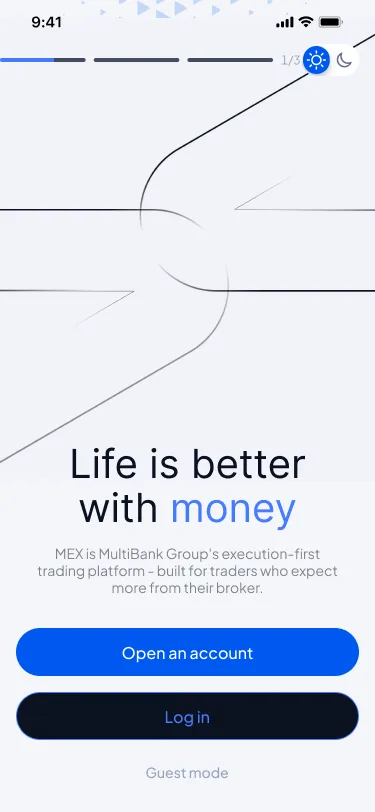
Onboarding with a way out
Let people look around before committing their identity and money.
UX decision
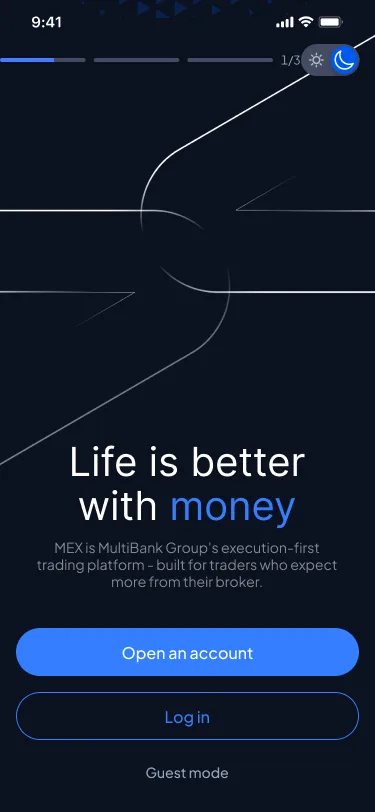
Three clear paths: Open an account, Log in, or Guest mode. Guest mode lets prospects browse live markets first, so the deposit ask comes after they’re interested, not before.
UI decision
Light and dark variants share one composition. A single typographic hero (“Life is better with money”) carries the brand colour on one word, over a quiet line illustration.
Feature 02
A home screen that sells the next step
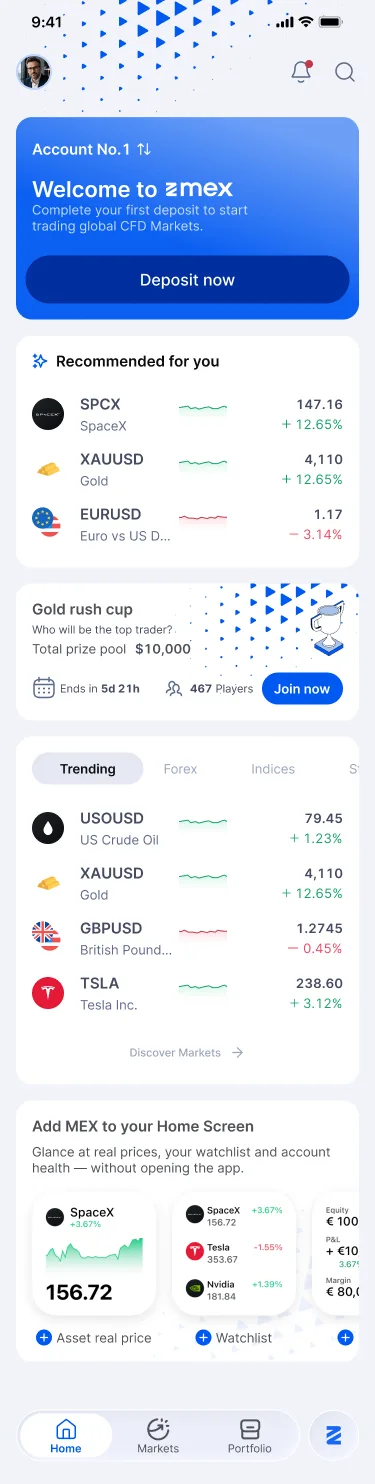
An unfunded account needs one obvious action. A funded account needs ideas.
UX decision
The top card changes with account state: “Welcome to emex · Deposit now” for new users. Below it, recommended instruments, a trading competition, trending markets and a home-screen widget promo build habit loops.
UI decision
A strong blue gradient card owns the first viewport. Instrument rows show the price, the change chip and a sparkline in a fixed rhythm, so scanning stays fast as the list grows.
Feature 03
Single asset: depth without clutter
Traders need chart, sentiment, costs, events and news before placing a trade, and a way to act at any moment.
UX decision
Information is ordered by decision weight: chart → price range → price alerts → trading conditions → economic calendar → news → about. A sticky Sell/Buy bar keeps the action one tap away throughout.
UI decision
Each topic sits in its own rounded section with a consistent header. Price alerts are one-tap chips (−10%, −5%, +5%, +10%). The price range bar shows the sellers/buyers split with red and green, without extra labels.
Feature 04
A VIP tier that feels earned
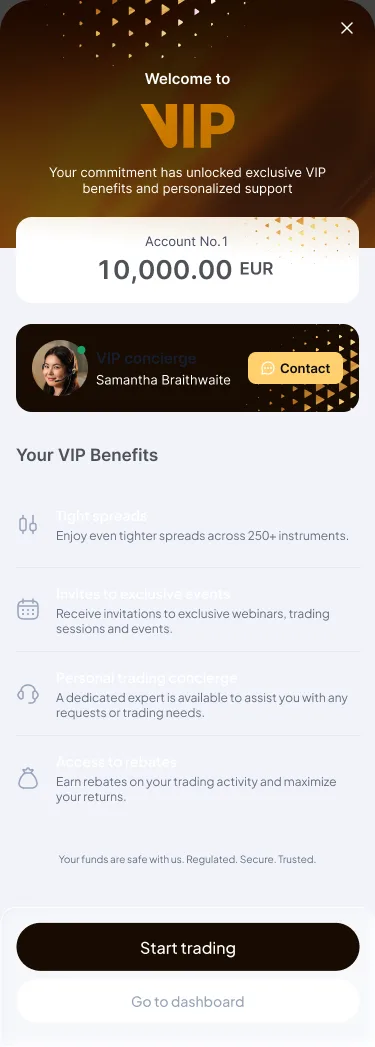
High-value clients should feel recognised the moment they qualify, and know what they’ve unlocked.
UX decision
A one-time explainer appears when the account qualifies. It shows the qualifying balance, introduces a named personal concierge, lists four concrete benefits, then gives two exits: Start trading or Go to dashboard.
UI decision
A darker, gold-accented header breaks from the everyday blue on purpose. Benefits use icon + title + one line, and the concierge card has a direct Contact button.
Design system. The visual language underneath.
This project used the MultiBank design system I maintain. Its semantic tokens, shared by 20 designers and 40 engineers, let light and dark themes and two brands come from one component set.
Typography. Inter across the app. A Heading/H3 22/28 semibold for section titles, Body 2 15/19 for rows and XS 10/13 for meta labels.
Colour tokens
- surface/brand#0058F1
- core/body-green#1AA266
- core/body-red#C4394A
- surface/background#F1F3F9
Semantic naming (surface/, core/, chips/, button/) so themes swap without touching components.
Pill buttons (radius 999) for primary actions, and 16–24px card radii for content.
Profit/loss colours are reserved strictly for price direction, never for decoration.
Outcome. What changed.
First-deposit conversion from new sign-ups up 18% after the home redesign.
1 in 4 active traders set a price alert in the first month.
App Store rating rose from 4.3 to 4.7 within two releases.