MultiBank Group · MEX
Account Health
Turning margin calls from a shock into a signal.
- Brand
- MultiBank Group · MEX
- Platform
- iOS · Android · Email
- My role
- Lead Product Designer
- Year
- 2026
The context. Who it’s for and what had to change.
About the brand
MEX is MultiBank Group’s flagship trading app, where retail clients trade leveraged CFDs on forex, metals, indices and shares. Leverage of up to 1:1000 makes every account sensitive to market moves, so how clearly the app explains risk directly shapes client outcomes, support load and trust in the broker.
The user problem
Margin level is the single most important number in a leveraged account, and the least understood. It sat in a details screen as a bare percentage, so a trader could easily learn what it meant only when a margin call blocked new trades, or after a stop-out had already closed their positions.
The business goal
Reduce surprise stop-outs and the support contacts and churn that follow them, without crossing into advice. Every message had to be accurate, compliant and calm, and work the same in the app, in push notifications and in email.
Features I designed. The need, the flow, the pixels.
Feature 01
One signal, four states
Know at a glance whether my account is safe, without understanding margin maths first.
UX decision
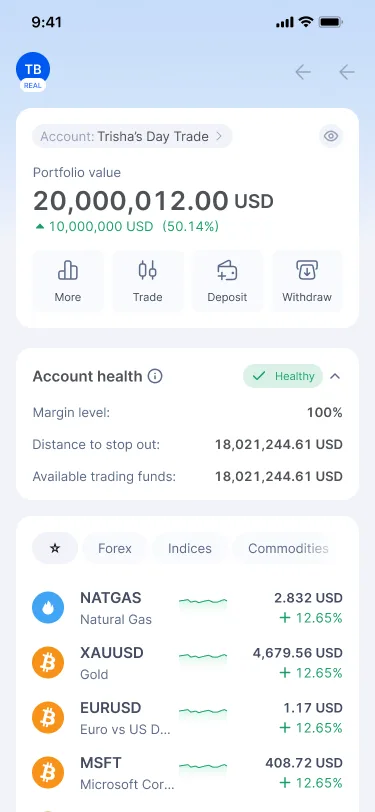
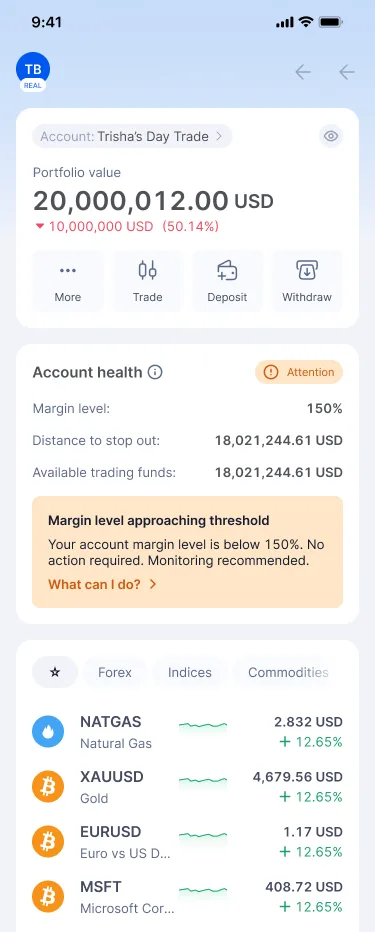
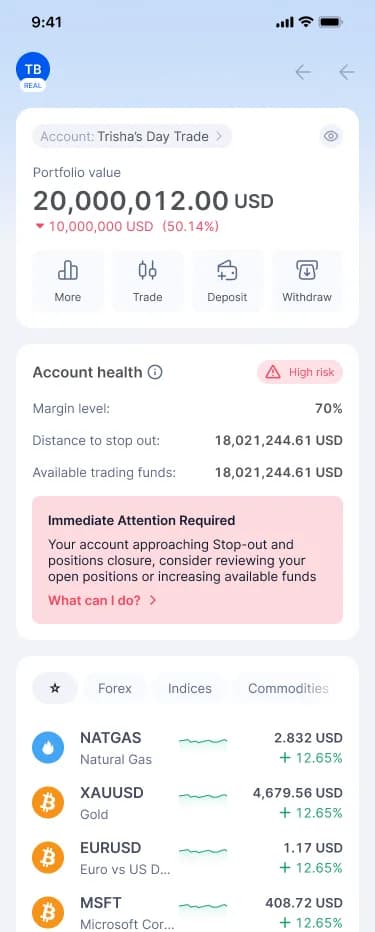
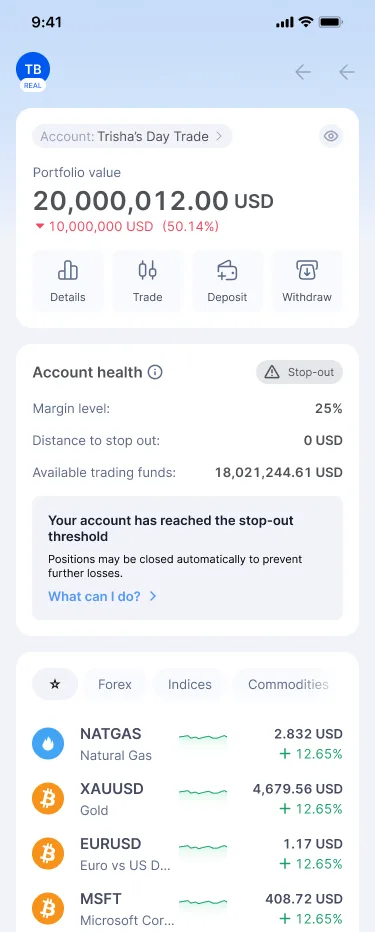
I turned margin level into a single Account Health card on the home screen and mapped it to four states traders can act on: Healthy (150%+), Attention (around 100%), High risk (below 70%) and Stop-out. The card always shows the three numbers that matter, margin level, distance to stop-out and available funds, so the label never hides the data.
UI decision
Each state pairs a colour with an icon and a word (Healthy, Attention, High risk, Stop-out), so it never depends on colour alone. Warning states add an inline banner with a plain-language headline and a single “What can I do?” entry point, keeping the card scannable when everything is fine.
Feature 02
Every warning comes with a way out
When something’s wrong, tell me what I can actually do about it, right now.
UX decision
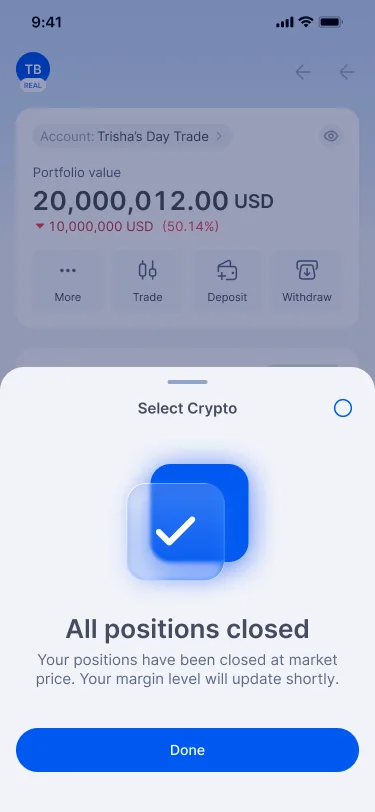
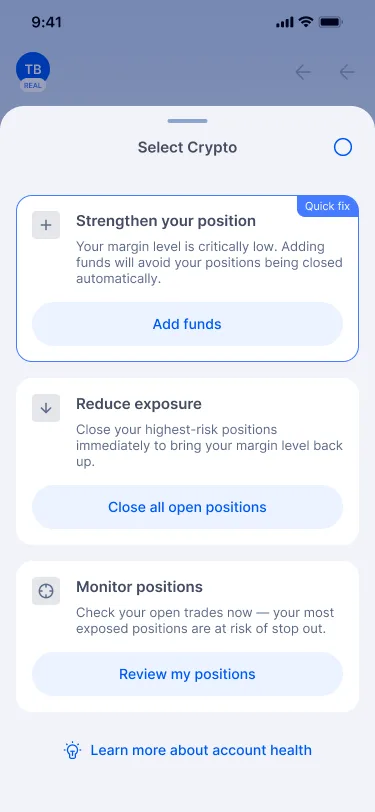
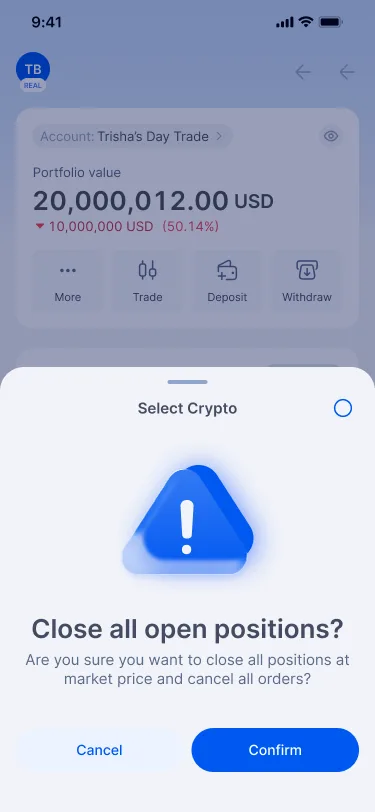
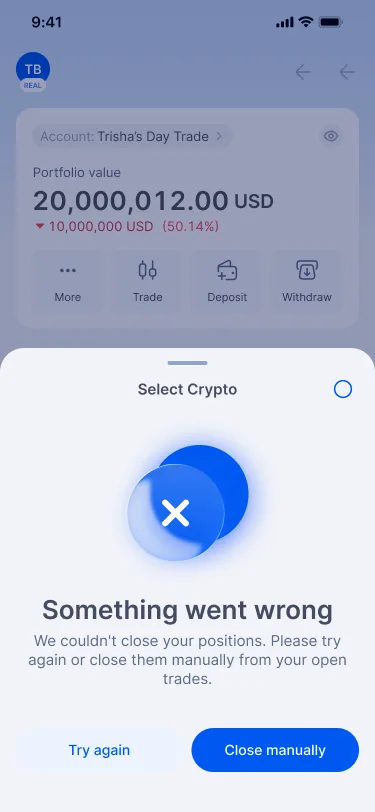
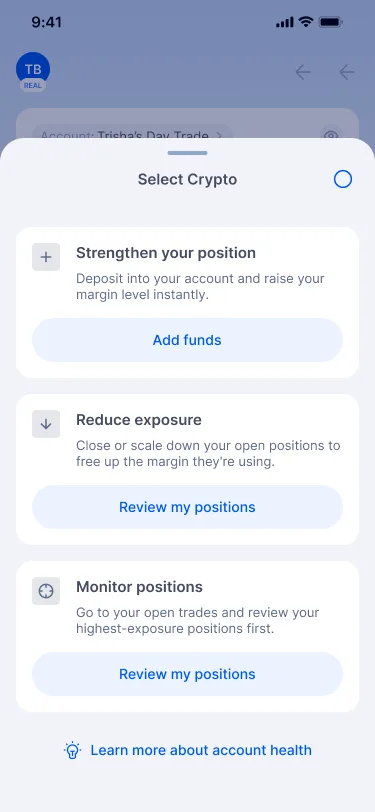
“What can I do?” opens a sheet with three recovery paths in order of impact: strengthen your position (deposit), reduce exposure (close or scale down) and monitor positions. In High risk the copy gets more direct and the deposit option is tagged “Quick fix”. Closing everything is one tap away, but always behind a confirmation, with designed success and failure states so the user is never left guessing.
UI decision
Each action is a card with a verb-led title, one line of consequence and one button. The destructive “Close all open positions” confirmation uses a warning illustration and spells out what will happen (“at market price and cancel all orders”). The error state offers both “Try again” and “Close manually”.
Feature 03
A margin call that calms instead of alarms
At the moment of highest stress, help me understand what happened and recover, not panic.
UX decision
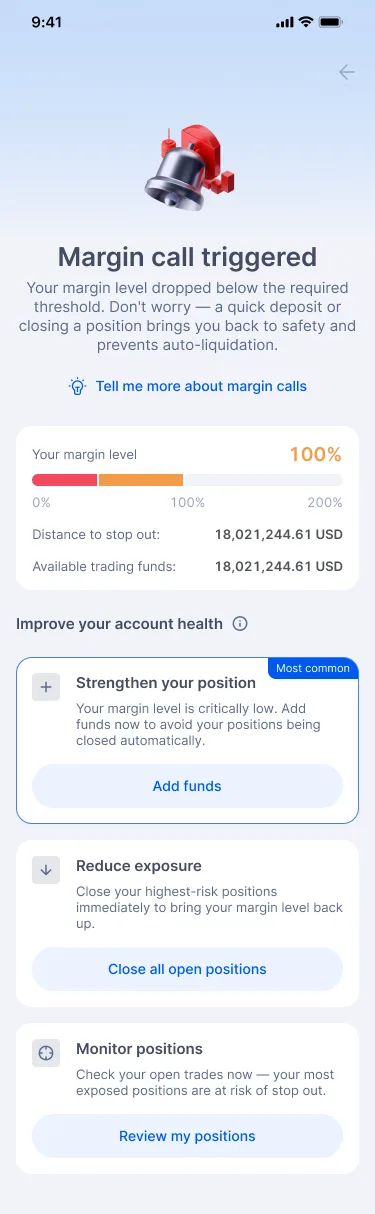
When margin level crosses the margin-call threshold, a full-screen takeover replaces the usual banner. That's the one moment the app interrupts. It leads with reassurance (“Don’t worry — a quick deposit or closing a position brings you back to safety”), shows where the account sits on a margin-level scale, then lists the recovery options with the most common one flagged.
UI decision
A red 3D bell gives urgency without the visual language of failure. The horizontal scale with 0%, 100% and 200% markers makes “how close am I?” visible instead of numeric, and a “Tell me more about margin calls” link opens the explainer for people who want the mechanics.

Feature 04
Stop-out: radical transparency after the worst moment
If my positions were closed, show me exactly what happened and why, and how to avoid it next time.
UX decision
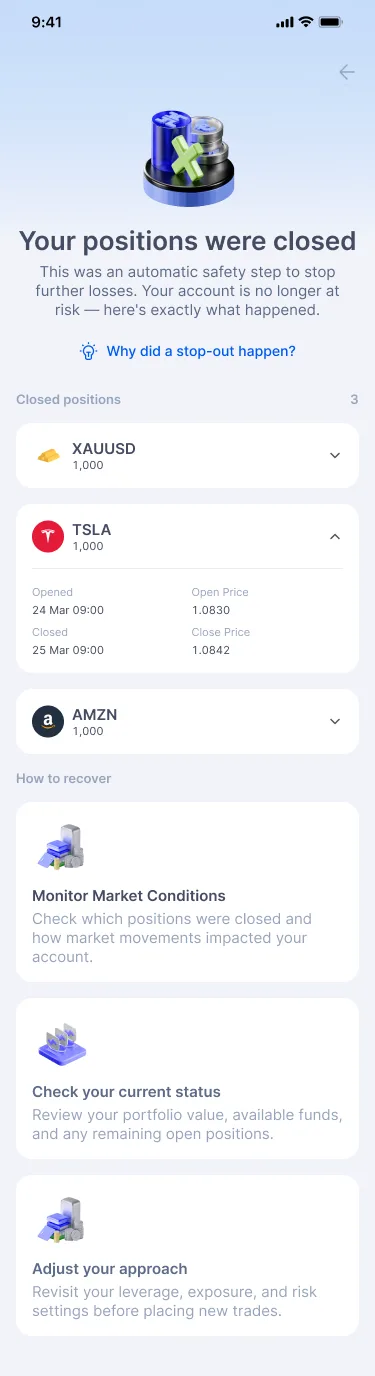
After a stop-out, the app explains instead of just reporting. “Your positions were closed” frames it as an automatic safety step, then lists every closed position with open and close prices and times. Next steps follow (check conditions, review status, adjust your approach), and a linked explainer covers how stop-outs work, which positions close first and how to prevent them.
UI decision
Closed positions use expandable rows so the summary stays short but the full detail is there. The explainer uses a numbered timeline, a threshold scale and an everyday analogy (a landlord removing inventory, “a circuit breaker, not a penalty”) to make an abstract rule concrete.

Feature 05
Teach the model once, at the right time
Explain a new concept without a tutorial I’ll skip.
UX decision
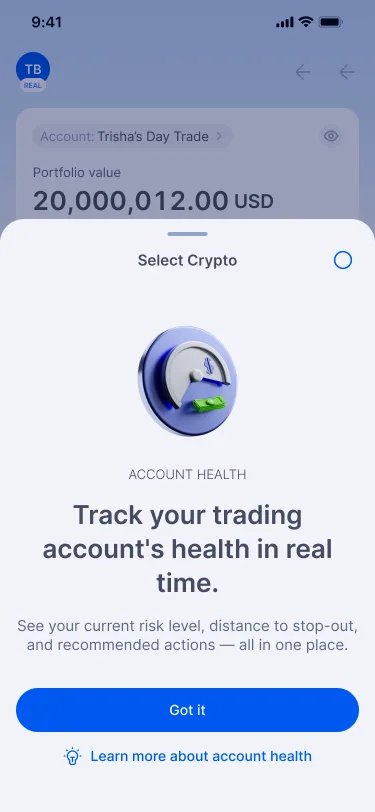
The first time someone taps Account Health, a short bottom sheet introduces it in one sentence and offers “Learn more”. The full explainer covers margin level, the formula, the four health states and how to improve health. It stays reachable from every warning, so education shows up when it's relevant rather than during onboarding.
UI decision
The explainer reuses the four state colours as a legend, so what people learn maps directly onto the card they will see later. The formula (Margin Level = Equity ÷ Used Margin × 100) sits in its own tinted block so it can be found again at a glance.
Feature 06
Reaching traders outside the app
Markets move when I’m not looking. Tell me before it’s too late, without spamming me.
UX decision
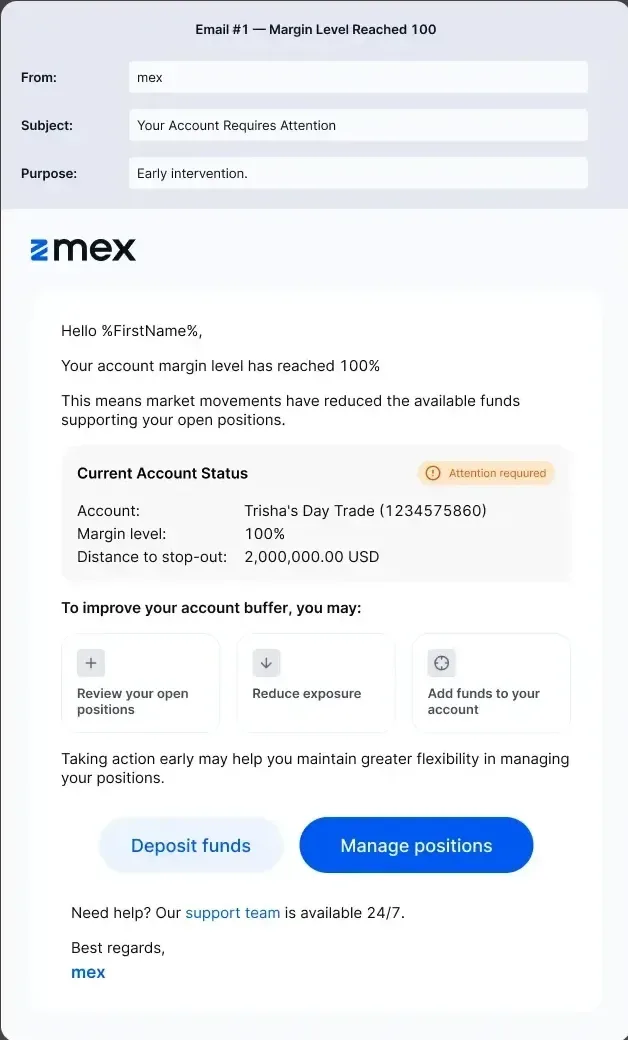
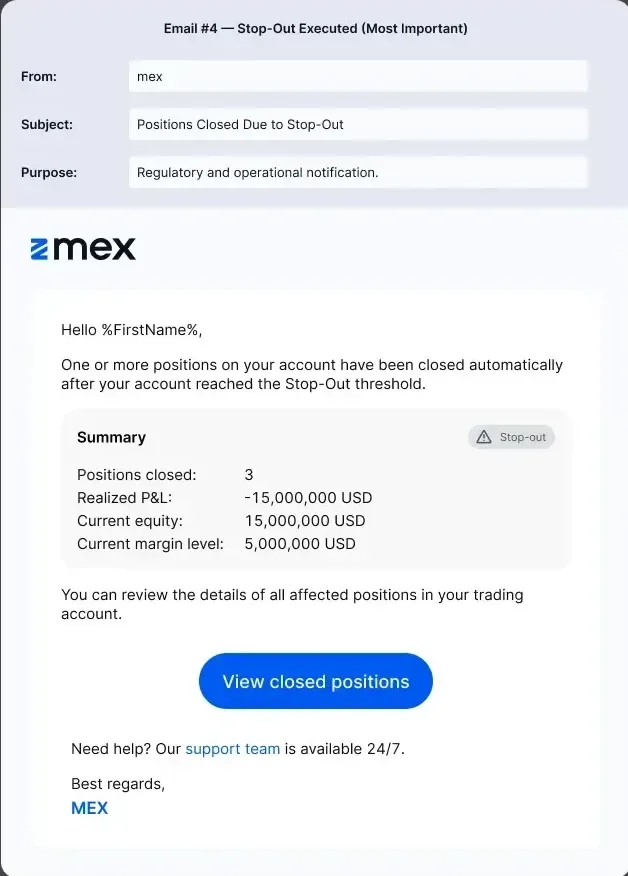
I mapped a notification ladder to the same thresholds: in-app banners when the user is on the dashboard, a dismissible push when they are elsewhere in the app or away (strong health, monitoring recommended, high attention, stop-out threshold), and four transactional emails that escalate from early intervention at 100% to the regulatory stop-out notice. Each one links straight to the relevant action.
UI decision
Emails share the in-app structure (status summary, recovery options, two clear CTAs) so a trader moving from inbox to app sees the same story. Subject lines escalate in tone (“Your Account Requires Attention” to “Positions Closed Due to Stop-Out”) instead of using alarm language from the start.
Design system. The visual language underneath.
Account Health is built entirely from the MEX design system, adding one new pattern: a four-step semantic status scale that the home card, banners, sheets, explainers, push notifications and emails all share.
Typography. Inter. Tabular figures for every money and percentage value so numbers don’t jump as they update, and short verb-led headlines on every warning.
Colour tokens
- Healthycore/body-green
- AttentionWarning amber
- High riskcore/body-red
- Stop-outNeutral grey
- Primary actionsurface/brand
Status is always colour + icon + word, so it reads for colour-blind users and in grayscale email clients.
Interrupt only once. Banners for Attention and High risk, and a full-screen takeover reserved for the margin call.
Never alarm without an action. Every warning, push and email ends in a concrete next step.
Outcome. What changed.
Stop-out related support tickets down 31% in the first quarter after launch.
46% of users who reached Attention took a recovery action within 24 hours.
Margin-call to stop-out conversion fell from 38% to 24%.